



| ??? 01/01/04 21:28 Read: times |
#61711 - RE: Special character for µ Responding to: ???'s previous message |
Hi Michael,
Another way of entering the µ character is to hold down the ALT key and enter the digits 230 on your numeric keypad and release the ALT key when finished. The µ should appear on the screen. In fact any of the below ASCII characters can be treated the same way. Regards, Charles Bannister 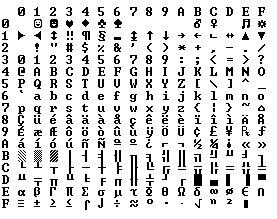 |
| Topic | Author | Date |
| Special character for µ | 01/01/70 00:00 | |
| RE: Special character for µ | 01/01/70 00:00 | |
| RE: Special character for µ | 01/01/70 00:00 | |
| RE: Special character for µ | 01/01/70 00:00 | |
| RE: Special character for µ | 01/01/70 00:00 | |
| RE: Special character for µ | 01/01/70 00:00 | |
| RE: Keep it portable | 01/01/70 00:00 | |
| RE: Special character for µ | 01/01/70 00:00 | |
| RE: Special character for µ | 01/01/70 00:00 | |
RE: Special character for µ - email | 01/01/70 00:00 | |
| Dont use Alt-230 | 01/01/70 00:00 |